How to find your details
Jamaica moved motor-vehicle registration and fitness fully electronic in July 2025 — everything comes by email now. Here's where each number lives, and how to get the documents Glovebox pulls for you.
Before you start, have these handy
- Your eMVRC email or receiptCertificate Number + MVID for registration
- Your e-Fitness referenceFrom your last vehicle inspection
- Your driver's licence cardTRN, issue date & control number for ticket checks

Registration · eMVRC
Motor Vehicle Registration
Since 21 July 2025, TAJ issues motor-vehicle registration only as an electronic certificate (the eMVRC) — no paper certificate and no windshield sticker. It's delivered straight to your email when you register or renew.
Where to find it
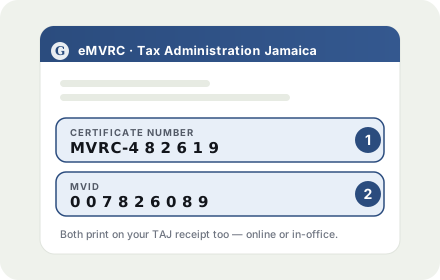
Certificate Number
In the eMVRC email TAJ sends you — and printed on your registration receipt, whether you renewed online or at a tax office.
MVID
Right next to the Certificate Number, in the same email and on the same receipt. The two numbers together unlock your certificate.
Lost the email or receipt? View or re-download your eMVRC any time at cgds.gov.jm using your Certificate Number + MVID.
TAJ eMVRC hub
Fitness · e-Fitness
Certificate of Fitness
Since 21 July 2025, the Island Traffic Authority (ITA) issues fitness only as an electronic certificate (e-Fitness) — no paper at the depot. You get it by email once your vehicle passes its roadworthiness check.
How to get it
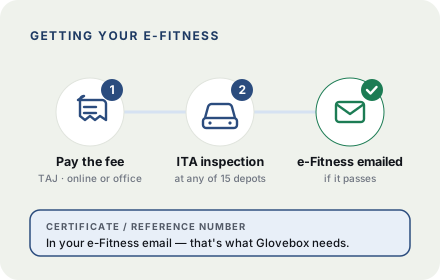
- 1Pay the fitness fee — online at jamaicatax.gov.jm or at a tax office. Keep the TAJ receipt.
- 2Take proof of payment and an active email address to any ITA examination depot (there are 15 island-wide).
- 3Your vehicle is inspected — brakes, lights, tyres, steering, exhaust and more.
- 4If it passes, your e-Fitness is emailed to you and downloadable at cgds.gov.jm.
Where to find it
Certificate Number
In the e-Fitness email you receive after your vehicle passes inspection (the reference number).
Chassis Number
On your vehicle registration — Glovebox pre-fills it from the vehicle you added.
No certificate yet? Book an inspection at an ITA depot first — then Glovebox can pull and store it for you.
ITA e-Fitness info
Driver's Licence
Driver's Licence details
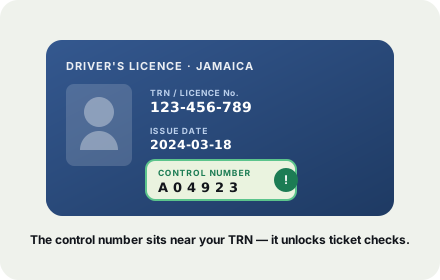
To check your traffic tickets automatically, Glovebox needs four details from your driver's licence — your TRN (licence number), date of birth, the licence issue date, and the control number.
Where to find it
TRN / Licence number
On the front of your driver's licence — it's the same as your TRN.
Original date of issue
On the BACK of the card, labelled “Original Date of Issue” — not the front's “Date Issued.” This is the one ticket checks need.
Control number
On the back of the card, near the TRN. It's the extra number that lets the GoJ portal confirm the licence is really yours.
Only the control number gates ticket checks — everything else is enough to save your licence and set renewal reminders.
Island Traffic Authority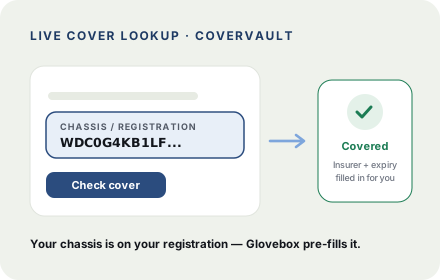
Insurance · CoverVault
Motor Insurance
Glovebox verifies your live insurance cover through the industry's CoverVault system — no policy documents to dig up. It just needs to find your vehicle.
Where to find it
Chassis or registration number
On your vehicle registration (eMVRC). Glovebox pre-fills the chassis from the vehicle you added.
We fill in your insurer and expiry automatically once the vehicle is matched.
Insurance Association of JamaicaIndicative guidance from public sources (TAJ · ITA · JIS) — always verify officially with TAJ, ITA or your insurer.